AI image generation has evolved beyond simple text-to-image tools, and many creators now want to train their own custom models for unique styles, characters, and creative projects. Two popular tools in this space are FluxGym and ComfyUI, but they serve different purposes. FluxGym focuses on simplifying the process of training FLUX LoRA models, making it easier for beginners to create customized AI models.
ComfyUI, on the other hand, provides a powerful node-based workflow system for users who want advanced control over AI image generation. Choosing between these tools depends on your experience level, goals, and workflow requirements. In this guide, we will compare FluxGym vs ComfyUI to help you decide which AI image training tool is the right choice.
Read More: FluxGym vs Kohya SS: Which AI LoRA Training Tool Is Better?
What Is FluxGym?
FluxGym is a user-friendly AI training tool created to simplify the process of training FLUX LoRA models. It is designed for users who want to customize FLUX models without dealing with complicated command-line processes and advanced technical configurations.The main purpose of FluxGym is to make LoRA training easier for beginners and creators. Instead of spending hours setting up different tools, users can focus on preparing their datasets and improving the quality of their AI models.
FluxGym is especially useful for people who want to train custom AI models for characters, artistic styles, products, and other creative concepts. Its simple workflow makes it easier for new users to understand how AI model training works.
What Is ComfyUI?
ComfyUI is an advanced node-based interface for AI image generation and workflow creation. It allows users to connect different nodes to build customized AI pipelines and control almost every part of the image-generation process.Unlike traditional AI image tools with simple buttons and menus, ComfyUI gives users complete control over models, samplers, image processing, and automation. This flexibility has made it popular among experienced AI artists and developers.
However, the power of ComfyUI also makes it more complex. Beginners often need time to understand workflows, nodes, and different settings before they can use it effectively.
FluxGym vs ComfyUI: Main Difference
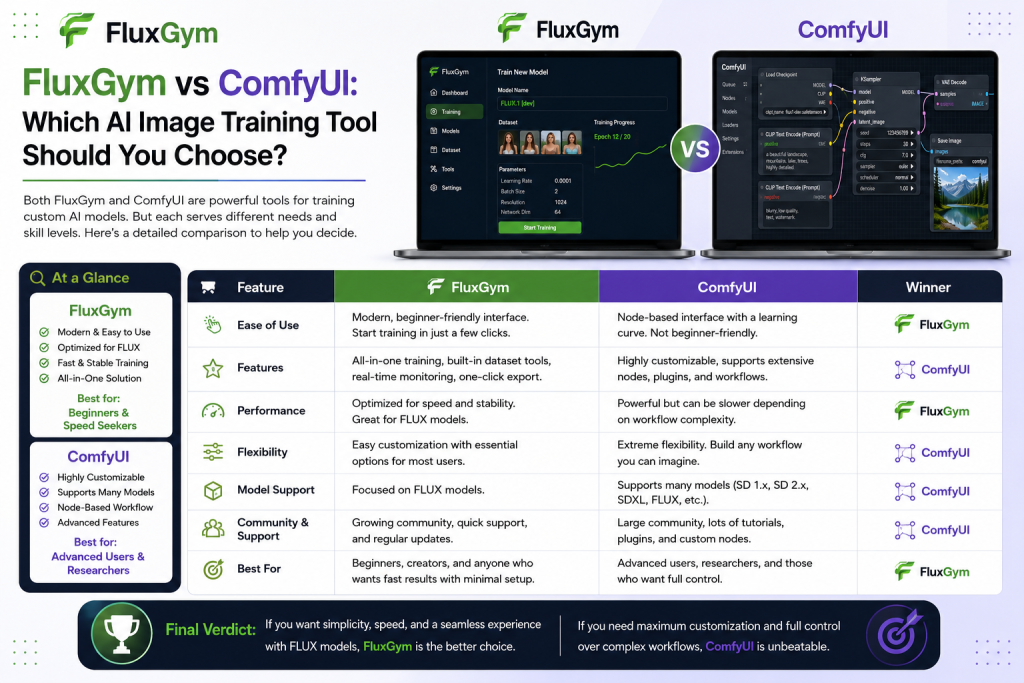
The biggest difference between FluxGym and ComfyUI is their primary purpose.
FluxGym is mainly focused on training FLUX LoRA models, while ComfyUI is designed for creating advanced AI image-generation workflows. One focuses on making training easier, and the other focuses on providing maximum creative control.If your main goal is to create a custom LoRA model, FluxGym provides a more direct workflow. If you want to experiment with different AI techniques and create complex image pipelines, ComfyUI offers more possibilities.
Which Tool Is Easier to Use?
For beginners, FluxGym is usually the easier option because it removes much of the technical complexity involved in AI training. The interface is designed around a clear training process, allowing users to upload images, adjust settings, and start training without needing advanced knowledge.Many new AI users find traditional training methods confusing because they involve multiple tools and manual configurations. FluxGym reduces these difficulties by providing a more beginner-friendly experience.
ComfyUI, on the other hand, requires more learning. The node-based system is extremely powerful, but beginners may feel overwhelmed when they first see complex workflows with many connected elements.
FluxGym vs ComfyUI for LoRA Training
When it comes to training LoRA models, FluxGym has a more focused approach. It is built around the idea of helping users create custom FLUX models with fewer steps and less technical setup.A good dataset, correct training settings, and proper configuration are still important, but FluxGym helps organize the process in a simpler way. This makes it a practical choice for creators who are mainly interested in FLUX LoRA training.
ComfyUI can work with LoRA models during image generation, but it is not primarily a dedicated LoRA training platform. Many users prefer specialized training tools first and then use ComfyUI afterward for generating images with their trained models.
FluxGym vs ComfyUI: Performance and Flexibility
ComfyUI has a major advantage when it comes to flexibility. Because of its node-based workflow system, users can create highly customized AI pipelines that combine different models, effects, and processing methods.Professional AI artists often use ComfyUI because it allows them to control every stage of image creation. It is suitable for advanced projects where users need automation, complex workflows, or unique generation methods.
FluxGym takes a different approach by focusing on simplicity. Instead of offering unlimited customization, it provides an easier path for users who want to train models without unnecessary complexity.
Which Tool Is Better for Beginners?
For someone starting with AI model training, FluxGym is the better choice. Beginners usually want a tool that helps them understand the basics without requiring advanced technical knowledge.With FluxGym, users can learn important concepts such as dataset preparation, training settings, LoRA creation, and model testing in a more straightforward way.
ComfyUI is better suited for users who already have experience with AI image generation or those who are willing to spend time learning advanced workflows.
When Should You Choose FluxGym?
FluxGym is a good option if you:
- Want to train FLUX LoRA models easily
- Are new to AI model training
- Prefer a simple interface
- Focus mainly on custom AI characters or styles
FluxGym is especially valuable for creators who want results quickly without spending too much time learning complicated technical systems.
When Should You Choose ComfyUI?
ComfyUI is a better choice if you:
- Want complete control over AI workflows
- Enjoy experimenting with advanced settings
- Need custom image-generation pipelines
- Already understand AI models and workflows
For experienced users, ComfyUI can become a powerful creative platform because almost every part of the process can be customized.
Can You Use FluxGym and ComfyUI Together?
Yes, many AI creators use both tools as part of the same workflow. They are not necessarily competing tools because they solve different problems.A common approach is using FluxGym to train a custom FLUX LoRA model and then loading that LoRA into ComfyUI for advanced image generation. This combination gives users the simplicity of FluxGym and the flexibility of ComfyUI.
Using both tools together can create a complete AI workflow where training and image generation are handled separately but efficiently.
FluxGym vs ComfyUI: Which One Should You Choose?
The best choice depends on your goals and experience level. FluxGym is ideal for users who want a simple and focused way to train FLUX LoRA models. It removes many technical barriers and helps beginners enter the world of AI model customization.ComfyUI is better for users who want advanced control and are interested in building complex AI workflows. It requires more learning but provides much greater flexibility.
For most beginners, starting with FluxGym is a smart choice. Once you understand AI models and workflows better, learning ComfyUI can help you unlock more advanced creative possibilities.
Conclusion
FluxGym and ComfyUI are both powerful tools for AI image creators, but they are built for different needs. FluxGym is the better choice for users who want a simple and beginner-friendly way to train FLUX LoRA models without dealing with complicated workflows. It helps creators focus on dataset preparation and model training with a smoother learning experience.ComfyUI is more suitable for advanced users who want complete control over AI image generation workflows. Its flexible node-based system allows users to build complex pipelines and customize every part of the creative process.