Before installing FluxGym, it’s important to make sure your computer is capable of handling AI model training efficiently. While FluxGym is designed to simplify the process of training FLUX LoRA models through a user-friendly interface, the software still relies on your system’s hardware to deliver smooth performance. Components such as your graphics card, processor, memory, and storage all play a significant role in how quickly and reliably training is completed.
Understanding the system requirements before you begin can save time and prevent common issues like installation errors, slow training speeds, or unexpected crashes. Whether you’re using Windows, macOS, or Linux, knowing the minimum and recommended specifications will help you prepare your device for the best possible experience. In this guide, we’ll explain the hardware and software requirements for running FluxGym and share practical tips to ensure your system is ready for successful FLUX LoRA training.
Read More: How Do I Use FluxGym to Train My First FLUX LoRA Model?
Why System Requirements Matter
AI model training is much more demanding than everyday computer tasks. Unlike browsing the web or editing documents, training a FLUX LoRA model requires your computer to process thousands of calculations every second. The better your hardware, the faster and more efficiently FluxGym can complete these tasks.
Meeting the minimum requirements may allow FluxGym to launch, but training large datasets or high-resolution images could still be slow. A system that meets the recommended specifications provides a smoother experience, reduces crashes, and allows you to experiment with more advanced training settings without running into performance limitations.
Operating System Requirements
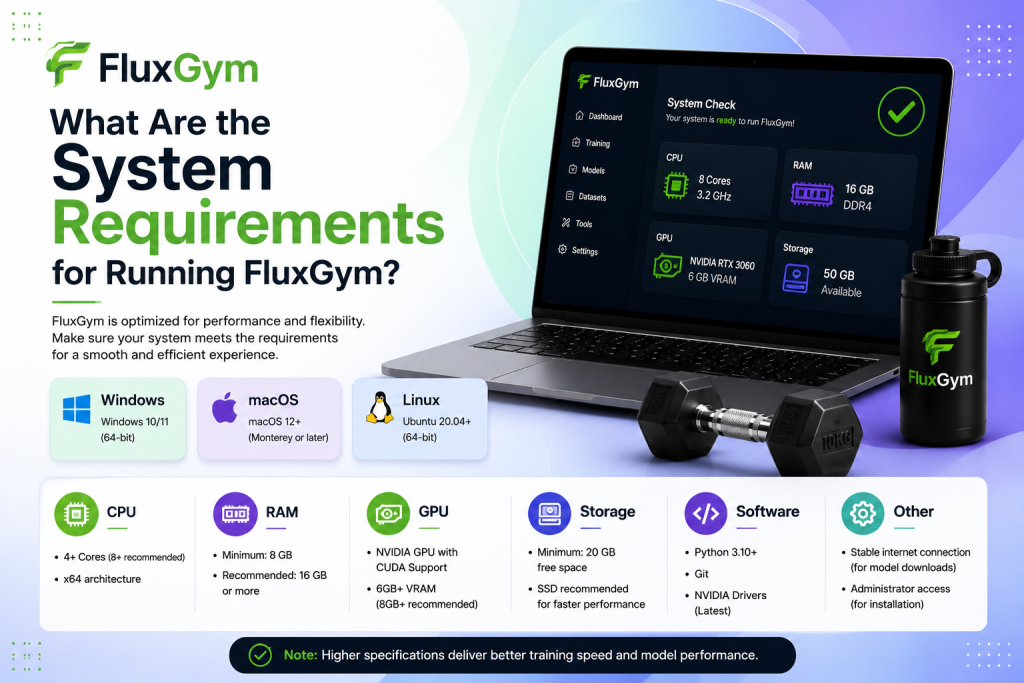
FluxGym supports the major desktop operating systems, giving users flexibility regardless of their preferred platform. Many creators use Windows because of its broad compatibility with NVIDIA GPUs, while developers often prefer Linux for its stability and performance. macOS users can also run FluxGym, although hardware compatibility and AI acceleration may differ depending on the device.
Keeping your operating system fully updated is recommended before installing FluxGym. Recent updates often include driver improvements, security patches, and compatibility fixes that help AI software run more reliably.
Processor (CPU) Requirements
Although the graphics card performs most of the heavy AI computations, the processor still plays an important role. The CPU manages data loading, image preprocessing, and communication between different parts of the system during training.
A modern multi-core processor is recommended for the best experience. Older dual-core processors may still work, but users can expect slower loading times and reduced overall responsiveness when working with large datasets.
Graphics Card (GPU) Requirements
The GPU is the most important hardware component for FluxGym. AI model training relies heavily on graphics processing power, making a dedicated GPU almost essential for practical training speeds.
Most users achieve the best performance with a modern NVIDIA graphics card that supports CUDA acceleration. While the software may run on lower-end hardware for small projects, larger datasets and higher image resolutions require additional GPU memory to complete training efficiently.
If your graphics card has limited VRAM, you can often reduce the training resolution or adjust certain settings to fit within your available resources. Although this may increase training time, it still allows many users to create high-quality LoRA models without upgrading immediately.
Memory (RAM) Requirements
System memory is another important factor that affects FluxGym’s overall performance. RAM stores temporary data while your images are being prepared and processed during training.
For beginners working with smaller datasets, a moderate amount of RAM is usually sufficient. Users planning to train larger image collections or multitask with other creative software should consider installing additional memory to improve stability and responsiveness.
Having enough RAM also reduces the likelihood of slowdowns when preview images are generated or multiple applications are open simultaneously.
Storage Requirements
FluxGym itself does not require a massive amount of storage, but AI projects can quickly consume disk space. Training datasets, downloaded base models, generated preview images, and exported LoRA files all require additional room.
Installing FluxGym on a solid-state drive (SSD) significantly improves loading speeds compared to a traditional hard drive. Faster storage also helps reduce waiting time when importing datasets and saving completed projects.
Leaving extra free space on your drive ensures the software has enough room for temporary files created during training.
Internet Connection
An internet connection is typically needed when downloading FluxGym, installing required dependencies, or obtaining FLUX base models. Once everything has been installed, many training tasks can be performed locally without maintaining a constant internet connection.
A stable connection is still useful for downloading updates, accessing documentation, and sharing completed LoRA models with online communities.
Recommended Hardware for Beginners
If you’re just starting with FluxGym, it’s worth aiming for a balanced computer rather than focusing on one powerful component. A modern processor, a dedicated NVIDIA GPU with sufficient VRAM, enough RAM for multitasking, and an SSD will provide a comfortable experience for most beginners.
Many users successfully train their first LoRA models on mid-range gaming PCs or creator laptops. As your projects become larger or more complex, upgrading your graphics card or increasing your system memory can noticeably improve performance.
Minimum vs Recommended Specifications
| Component | Minimum | Recommended |
|---|---|---|
| Operating System | Windows, Linux, or macOS | Latest version of Windows, Linux, or macOS |
| Processor | Modern dual-core CPU | Recent multi-core Intel or AMD processor |
| RAM | 16 GB | 32 GB or more |
| Graphics Card | NVIDIA GPU with CUDA support | Modern NVIDIA GPU with higher VRAM |
| Storage | SSD with available free space | NVMe SSD with plenty of free storage |
| Internet | Required for downloads | Stable broadband connection |
Tips for Better Performance
Even if your computer meets the recommended specifications, there are several ways to improve FluxGym’s performance. Closing unnecessary background applications before training frees up RAM and processing power. Keeping your graphics drivers updated ensures the latest performance improvements are available.
Using high-quality but well-organized datasets can also reduce processing overhead. If you encounter memory limitations, lowering the training resolution or reducing the batch size often allows training to continue successfully without major hardware upgrades.
Common Performance Issues
Some users believe FluxGym itself is slow when the actual problem is outdated hardware or incorrect configuration. Insufficient VRAM, low available RAM, and limited storage space are among the most common causes of slow training or unexpected crashes.
Driver issues can also prevent FluxGym from detecting your GPU correctly. Updating your graphics drivers and ensuring CUDA is properly installed usually resolves many compatibility problems. Regularly checking for software updates can further improve stability and performance.
Conclusion
FluxGym makes FLUX LoRA training more accessible, but having the right system specifications is essential for a smooth and efficient experience. A compatible operating system, a capable NVIDIA GPU, enough RAM, and fast SSD storage can significantly improve training speed, stability, and overall performance. While the software may run on entry-level hardware for smaller projects, meeting the recommended requirements allows you to handle larger datasets and produce better results with fewer interruptions.
Before starting your first training project, take a few minutes to check your computer’s hardware and update any necessary drivers or software. Investing in a well-prepared system not only reduces technical issues but also helps you focus on creating high-quality LoRA models. With the right setup, FluxGym becomes a powerful and reliable tool for anyone looking to explore FLUX AI training, whether you’re a beginner or an experienced creator.