Training a high-quality FLUX LoRA model requires more than just uploading images and starting the process. The settings you choose in FluxGym directly affect how accurately your model learns details, styles, and concepts from your dataset. With the right configuration, you can create LoRA models that generate consistent, detailed, and professional-looking images. However, incorrect settings may lead to problems such as overfitting, low-quality outputs, or poor model performance.
FluxGym makes LoRA training easier for beginners by providing a simpler workflow, but understanding key options like resolution, learning rate, training steps, and batch size can help you achieve better results. This guide explains the best FluxGym settings and practical tips for successful FLUX LoRA training.
Read More: Why Is FluxGym Not Working and How Can I Fix Common Errors?
Why Are FluxGym Settings Important for LoRA Training?
A LoRA model works by teaching the FLUX model new information from your dataset. During training, FluxGym uses different parameters to control how quickly and effectively the model learns. These settings decide whether your LoRA captures useful details or simply memorizes the training images.
Using incorrect settings can lead to common problems such as overfitting, poor image quality, weak results, or unrealistic outputs. A balanced configuration allows the model to understand the concept while still creating new and unique images.
Start With a High-Quality Dataset
Before adjusting FluxGym settings, focus on preparing a strong dataset. The quality of your training images has a bigger impact on the final LoRA result than many technical settings. A clean and well-organized dataset helps the model learn faster and produce more accurate outputs.
For character or object training, use images that show different angles, poses, and details. For style training, choose images that clearly represent the artistic look you want the model to understand. Avoid blurry, low-resolution, or unrelated images because they can reduce the quality of your trained LoRA.
Important dataset factors include:
- Clear and high-quality images
- Consistent subject or style
- Proper image captions
- Different useful angles and variations
A smaller dataset with carefully selected images often performs better than a large dataset with poor-quality examples.
Choose the Right FLUX Base Model
The base model selection is one of the most important steps in FluxGym training. Your LoRA learns from the selected FLUX model, so you need to choose a model that matches your intended workflow.
Using the wrong base model can create compatibility problems and reduce the quality of generated images. Before starting training, confirm that the selected FLUX model is the same one you plan to use when generating images with your finished LoRA.
A correct base model gives your LoRA a strong foundation and improves consistency in the final results.
Configure the Training Resolution
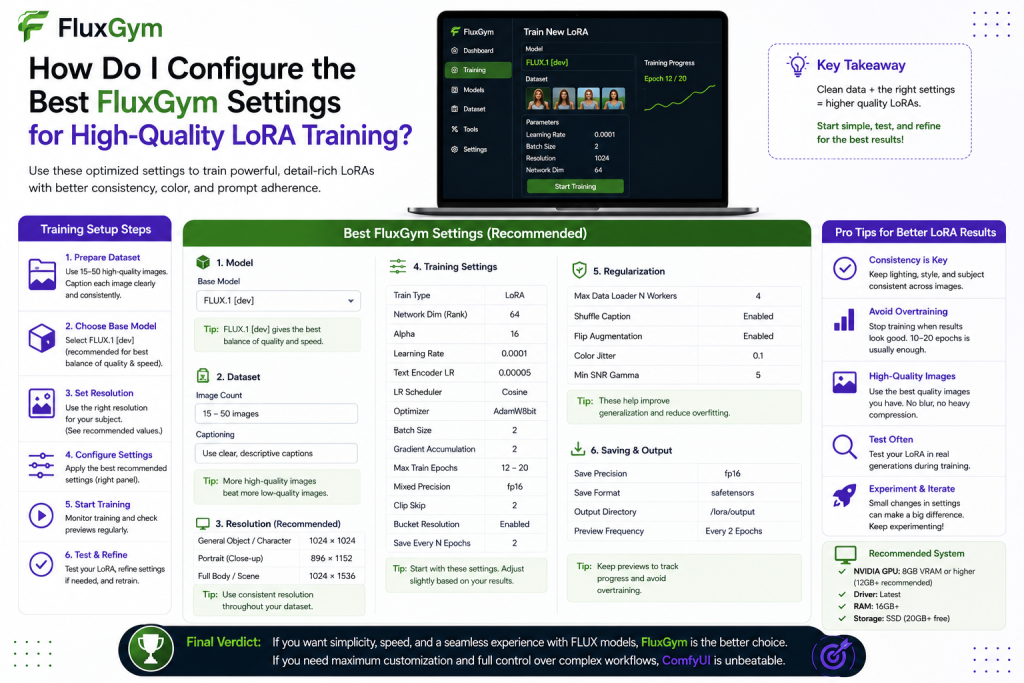
Resolution controls how much detail the model can learn from your images. Higher resolution allows FluxGym to capture more fine details, but it also requires more GPU memory and increases training time.
For most users, a balanced resolution is the best choice. Extremely high resolution is not always necessary because dataset quality and proper settings usually have a greater effect on results.
If you have limited GPU memory, lowering the resolution can help avoid errors while still producing good-quality LoRA models. The goal is to find a balance between image details and system performance.
Adjust the Learning Rate Properly
The learning rate controls how quickly the LoRA model learns from your dataset. It is one of the most important settings because it affects how aggressively the model updates during training.
A learning rate that is too high may cause the model to learn too quickly and create overfitting. This means the LoRA may copy training images too closely instead of generating flexible results. A learning rate that is too low may produce weak results because the model does not learn enough information.
For beginners, using FluxGym’s recommended values is usually the best approach. Once you understand how training works, you can experiment with different learning rates depending on your project type.
Understanding Steps and Epochs
Training steps and epochs determine how much time the model spends learning your dataset. More training does not always mean better results because excessive training can reduce the model’s ability to create new variations.
During the training process, monitor the generated preview images. If the results continue improving, the training is working correctly. If the quality starts decreasing or images become too similar to your dataset, the model may be overtrained.
Finding the right training duration requires testing, but starting with moderate values is usually the safest option for beginners.
Select the Correct Batch Size
Batch size determines how many images FluxGym processes during each training step. A larger batch size can improve training efficiency, but it requires more GPU memory.
Users with powerful GPUs can use higher batch sizes, while users with limited VRAM should choose smaller values. A stable training process is more important than forcing maximum settings.
If you experience memory errors during training, reducing the batch size is one of the easiest ways to improve stability.
Monitor Preview Images During Training
One of the best features of FluxGym is the ability to check progress during training. Preview images allow you to see how your LoRA is learning and whether adjustments are needed.
Checking previews regularly helps identify problems before training finishes. You can notice if the model is not learning enough details, becoming too similar to the original images, or producing unwanted changes.
Monitoring progress saves time and helps you create better-quality LoRA models.
Recommended FluxGym Settings for Beginners
If you are training your first FLUX LoRA model, focus on stability instead of using advanced configurations. Beginners should start with balanced settings and adjust them slowly based on results.
A good starting approach includes using a quality dataset, recommended learning rate values, suitable resolution, moderate training steps, and regular preview checks. These simple adjustments are usually enough to create impressive results without unnecessary complexity.
How to Improve FLUX LoRA Quality After Training
After completing your training, test your LoRA with different prompts and settings. A model may perform differently depending on the type of image you generate.
Experiment with LoRA strength, prompt styles, and different image compositions to understand how your trained model behaves. Sometimes reducing the LoRA weight slightly can create more natural results by combining the learned concept with the original FLUX model.
Continuous testing helps you improve future training projects and create more accurate LoRAs.
Common FluxGym Settings Mistakes to Avoid
Many beginners make the mistake of changing multiple settings at the same time. When experimenting with FluxGym, adjust one setting at a time so you can clearly understand how it affects the final output.
Some common mistakes include using poor-quality images, training for too long, choosing the wrong base model, and increasing settings beyond what your hardware can handle. Keeping the workflow simple usually leads to better results.
Does Hardware Affect FluxGym Training Quality?
Your hardware affects how quickly you can train a LoRA and which settings you can use comfortably. A powerful GPU allows higher resolutions, larger batch sizes, and faster processing.
However, expensive hardware does not automatically create better LoRA models. Dataset quality, correct settings, and proper training methods are usually more important factors.
Even with limited hardware, you can achieve good results by optimizing your FluxGym configuration and choosing efficient training settings.
Conclusion
Configuring the best FluxGym settings for high-quality LoRA training requires a balance between the right dataset, suitable training parameters, and careful testing. There is no single perfect configuration for every project because each LoRA model has different goals, whether you are training a character, artistic style, product design, or a specific visual concept.
The best approach is to start with stable recommended settings, monitor the training progress, and make small adjustments based on the results. By optimizing important factors like resolution, learning rate, batch size, and training steps, you can create more accurate and consistent FLUX LoRA models. With practice and proper configuration, FluxGym becomes a powerful tool for producing customized AI images with professional-quality results.